![logo-3.png]](https://support.greencheckverified.com/hs-fs/hubfs/logo-3.png?height=29&name=logo-3.png)
| 🆕 Move accounts through due diligence yourself |
|
Hi there,
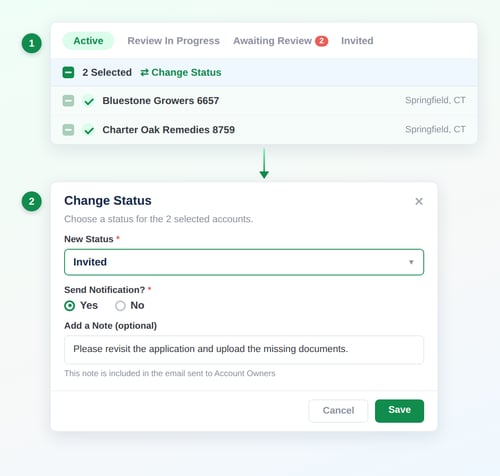
You can now change the due diligence status of your accounts directly in Green Check, one at a time or in bulk.
Until now, an account's status moved forward only when the business submitted their application. For accounts you manage on the business's behalf, that meant status could sit in Invited even after your team had everything it needed. It also meant you couldn't move an account out of Active and into another status (without switching the due diligence template). Now you have full control of the status! |
 |
|
Two ways to do it
Either way, you can move accounts to Invited, Awaiting Review, Review in Progress, or Active, from wherever they are today. No need to contact Green Check anymore to make the switch—it's now self-service! |
|
|
P.S. The Green Check User Community is now available! Access it from the "question mark" icon in the bottom left corner of your screen in Green Check.
Questions? Reply to this email, contact your relationship manager, or reach out to support@greencheckverified.com.
— The Green Check Team |