![logo-3.png]](https://support.greencheckverified.com/hs-fs/hubfs/logo-3.png?height=29&name=logo-3.png)
Green Check’s Ideas Portal makes it easy for you to share feedback, vote on feature ideas, and stay up to date on what we’re building next.
Feedback comes from different sources = direct requests from you and our client-facing teams, survey results, support tickets, pain points, etc. Feedback is then analyzed to come up with ideas, which are more concrete feature ideas that make their way onto the roadmap.
Your input directly influences our product priorities, and this new experience gives you full visibility into that process.
How to Access the Ideas Portal
Click the question mark icon (?) in the bottom-left corner of the app.
From there, you can explore the Feature Requests area where you can submit new requests and vote on existing ones. You can also See What's New (what's been recently released!).
For the purposes of this article and submitting new requests, click on the Feature Requests section to get started.

What You Can Do
Submit New Ideas
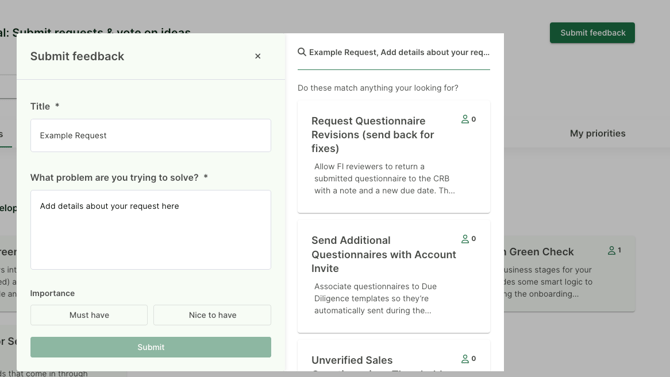
Have a feature request or improvement in mind? Click the Submit feedback button once you expand the Feature Requests section.
Once you start typing, you might see existing ideas pop-up on the right hand side of the modal. If an idea exists already; great! Vote on it here. Otherwise, submit your new request for us to review.
Vote on Ideas That Matter to You
Browse existing ideas and vote on the ones that would have the biggest impact for your team.
Voting allows us to understand what matters most across our client base. It helps us balance demand, impact, and timing so we invest in the right solutions first. The more feedback and votes an idea receives, the more insight it gives our product team when planning upcoming work.
Your votes help us prioritize what we build next. Click on the "person" icon ( ) to vote and add whether it's a must have, nice to have, or if you're not interested.
View All Your Feedback
See every request you’ve submitted and all ideas you've voted on by clicking on the My Priorities tab underneath the Submit feedback button.
Track What’s in Development
Explore what’s:
- Collecting feedback (these are the ideas that we need help prioritizing)
- Ideas currently in development
- Recently released (in the "See What's New" area). You can also share how you're liking newly released items there as well. Simply click into an item to leave us some feedback.
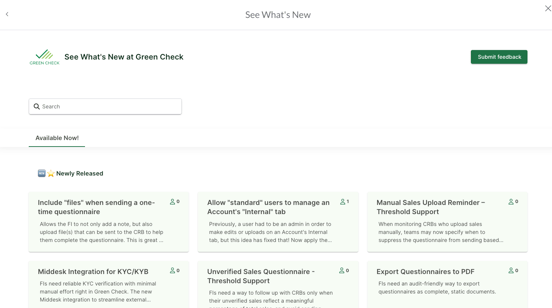
You can now see when your ideas move from request to reality.
Staying Informed
The Ideas Portal is always the most up-to-date source of information on:
- What’s coming next
- What we’re actively building
- What’s already shipped
We recommend checking in often to see new ideas, updates, and releases.
Thank you for helping us build a better product together.